
The Perfect Hybrid Desk Setup for Work and Play
A modern desk setup needs to do more than hold a laptop. For many people, the same space must support focused work, creative projects, gaming sessions, and moments of relaxation. A hybrid desk setup blends productivity and entertainment seamlessly, giving you a space that adapts to your day instead of forcing you to switch environments. When designed intentionally, a hybrid desk setup can improve your comfort, focus, and enjoyment—whether you’re deep in a project or unwinding with your favorite game.
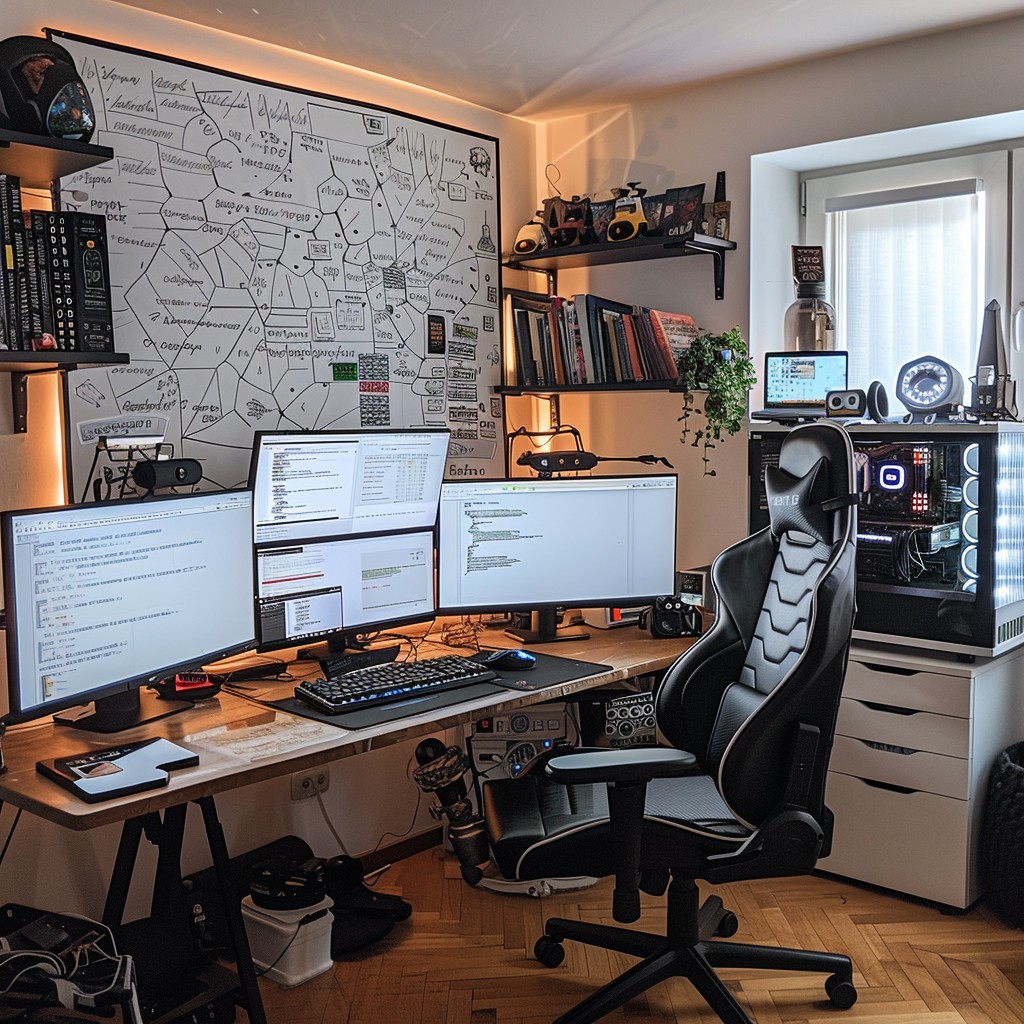
This guide explores how to build a desk setup that balances both worlds. It also connects naturally with related topics like choosing the right chair, building a dual-purpose workspace, hybrid lighting, essential accessories, and cable management to keep everything clean and functional.
Why hybrid desk setups are becoming essential
Remote work, flexible schedules, and digital lifestyles have blurred the line between work and play. Instead of having separate spaces for productivity and entertainment, many people now rely on a single desk for everything. A hybrid setup helps you:
- Stay focused during work hours
- Transition smoothly into gaming or relaxation
- Reduce clutter and visual noise
- Improve posture and comfort
- Enhance your overall digital wellbeing
When your desk supports both productivity and enjoyment, you’re more likely to maintain healthy habits and avoid burnout.
Start with the right desk
Your desk is the foundation of your hybrid setup. The right desk should offer enough space for both work tools and gaming gear without feeling cramped.
1. Choose the right size
A 120–160 cm desk works well for most hybrid setups. If you use multiple monitors or a large gaming display, consider a wider desk to avoid crowding.
2. Prioritize stability
Gaming sessions, typing, and multitasking all require a stable surface. Look for a desk with solid legs and minimal wobble.
3. Consider a sit–stand option
Sit–stand desks support better posture and energy management. They’re especially helpful for long workdays and can make gaming sessions more comfortable.
4. Keep the surface clean and minimal
A clutter-free desk reduces cognitive load and helps you stay focused. This becomes even more important when your desk serves multiple purposes.
Choose a monitor setup that works for both worlds
Your monitor configuration plays a major role in how your hybrid desk feels. The right setup should support productivity during the day and immersion at night.
1. Single ultrawide monitor
An ultrawide display is ideal for hybrid use. It offers:
- More screen real estate for multitasking
- Immersive gaming experiences
- Cleaner cable management
2. Dual-monitor setup
Two monitors give you flexibility—one for work, one for entertainment. This setup pairs well with dual-purpose workspace strategies.
3. Monitor arms for flexibility
Monitor arms free up desk space and allow you to adjust height, angle, and distance easily. This improves ergonomics for both work and play.
Pick the right chair for long-term comfort
Your chair affects your posture, comfort, and energy levels. Choosing between gaming chairs and office chairs is a common challenge, which we explore in detail in Gaming Chairs vs. Office Chairs.
For now, here are the essentials:
- Office chairs offer better ergonomics and long-term support
- Gaming chairs offer style, cushioning, and recline options
- Hybrid chairs blend ergonomic design with gaming aesthetics
The best choice depends on your posture, daily habits, and aesthetic preferences.
Lighting: the secret to a hybrid atmosphere
Lighting affects your mood, focus, and immersion. A hybrid desk setup needs lighting that adapts to different activities. This topic is explored more deeply in Hybrid Lighting Setups That Improve Focus and Mood.
For now, consider these essentials:
- Task lighting for work
- Ambient lighting for relaxation
- RGB or accent lighting for gaming
Smart lighting systems let you switch between modes with a single tap.
Accessories that elevate your hybrid desk
Small accessories can dramatically improve your comfort and workflow. We explore this in detail in Essential Accessories for a Hybrid Gaming-Work Desk, but here are the basics:
- Ergonomic keyboard and mouse
- Desk mat for comfort and aesthetics
- Headphone stand or hook
- USB hub for easy access
- Monitor light bar for eye comfort
These accessories help your desk feel organized and intentional.
Optimize your cable management
A hybrid desk setup can quickly become cluttered with cables from monitors, chargers, peripherals, and gaming gear. Good cable management keeps your space clean and reduces stress. For a deeper dive, see Cable Management Tips for Hybrid Workstations.
Start with:
- Cable sleeves or raceways
- Under-desk trays
- Velcro straps
- Wireless peripherals where possible
A clean setup improves both productivity and immersion.
Design your desk for smooth transitions
The key to a hybrid desk setup is the ability to switch between work and play effortlessly. Here’s how to design for smooth transitions:
1. Use profiles or presets
Many devices—monitors, keyboards, lighting systems—allow you to save presets. Create separate profiles for work and gaming.
2. Keep your workspace modular
Use accessories that can be moved or adjusted easily. For example, a retractable keyboard tray or a movable microphone arm.
3. Separate work and play visually
Use lighting, wallpapers, or desk mats to signal the shift between modes.
4. Maintain a clean baseline
A tidy desk makes transitions faster and reduces mental friction.
Why hybrid desk setups improve wellbeing
A well-designed hybrid desk setup supports both productivity and relaxation. It helps you:
- Stay focused during work
- Enjoy gaming without discomfort
- Reduce stress through better organization
- Maintain healthier posture
- Feel more in control of your environment
When your desk adapts to your needs, your day feels smoother and more balanced.
Summary / Key takeaways
The perfect hybrid desk setup blends productivity and entertainment into a single, adaptable space. By choosing the right desk, monitor setup, chair, lighting, accessories, and cable management strategies, you can create a workspace that supports both focus and enjoyment. When combined with insights from chair selection, dual-purpose workspace design, hybrid lighting, essential accessories, and cable management, your hybrid desk becomes a powerful foundation for a balanced digital lifestyle.
Reviewed by HGH Editorial